


Sooner or later, someone asks us: "Can people pay on the website?" They can. But first you need a payment gateway, and the choice matters more than it looks.
What a gateway does
A payment gateway does three jobs. It takes the money from your customer, by card, online banking (FPX), DuitNow or e-wallet. It puts that money in your bank account, a day or a few days later. And it tells your website the payment went through, so the system can issue a receipt, confirm a booking or register a member.
Your web developer handles the third part. The first two depend on which gateway you pick and how you set it up.
1. Open the account in the receiver’s name
The gateway account should belong to whoever receives the money: your association, your company. Not your web developer, and not a committee member personally.
The account is tied to the bank account the money goes to, and to the documents you register with. If it sits under someone else’s name, you’ll have trouble when that person leaves, and the money trail won’t match your own accounts.
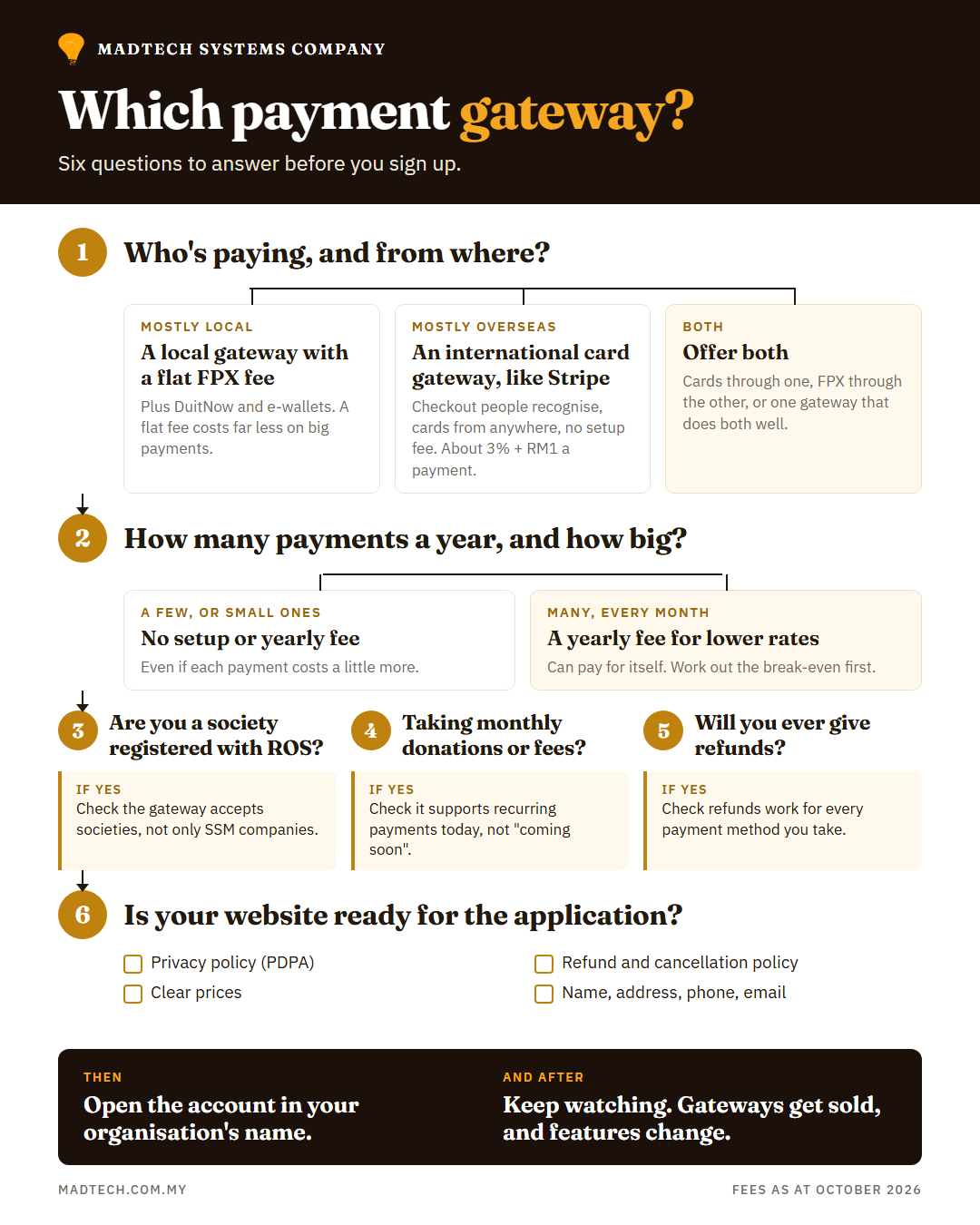
2. Start with who’s paying
Before comparing gateways, ask who your payers are and where they are.
If they’re local members, donors or customers, most will pay by FPX or DuitNow, and a Malaysian gateway with a flat fee on FPX will usually cost you less.
If many are from overseas, card payments matter most. For one of our clients, a tourism booking service, we chose Stripe. It’s recognised internationally, so visitors trust the checkout page. It handles credit cards well. And there’s no setup fee.
The trade-off is the transaction fee. Stripe charges 3% + RM1 on domestic cards and on FPX, plus 1% for international cards and another 2% if currency conversion is needed. On large payments, that adds up.
3. Read the fees properly
Gateways charge in two ways: a flat amount per transaction, or a percentage (sometimes both).
On a RM2,000 conference registration paid by FPX:
- Stripe at 3% + RM1: RM61.
- A gateway charging a flat RM1 per FPX payment: RM1.
On cards, nearly every gateway charges a percentage, so the gap is smaller.
4. Pay up front, or pay per payment?
The other choice is between paying nothing up front and a higher fee on every payment, or paying a setup or yearly fee in exchange for lower fees per payment. Stripe has no setup or yearly fee. Some local gateways charge a yearly fee; some offer a free plan and a paid plan with cheaper transactions.
Which is better depends on your volume. Billplz, for example, has a free plan at RM1.25 per FPX payment and a RM999-a-year plan at RM0.75. The paid plan saves 50 sen a payment, so it only pays for itself at about 2,000 FPX payments a year, roughly 170 a month. An association collecting membership fees once a year won’t get near that. A business taking bookings every day might.
So before you choose, estimate how many payments you’ll take in a year and their usual size, then work out the total cost on each gateway, not just the headline rate. Rates change, so check each gateway’s own pricing page before you sign up.
5. Get your documents and website ready before you apply
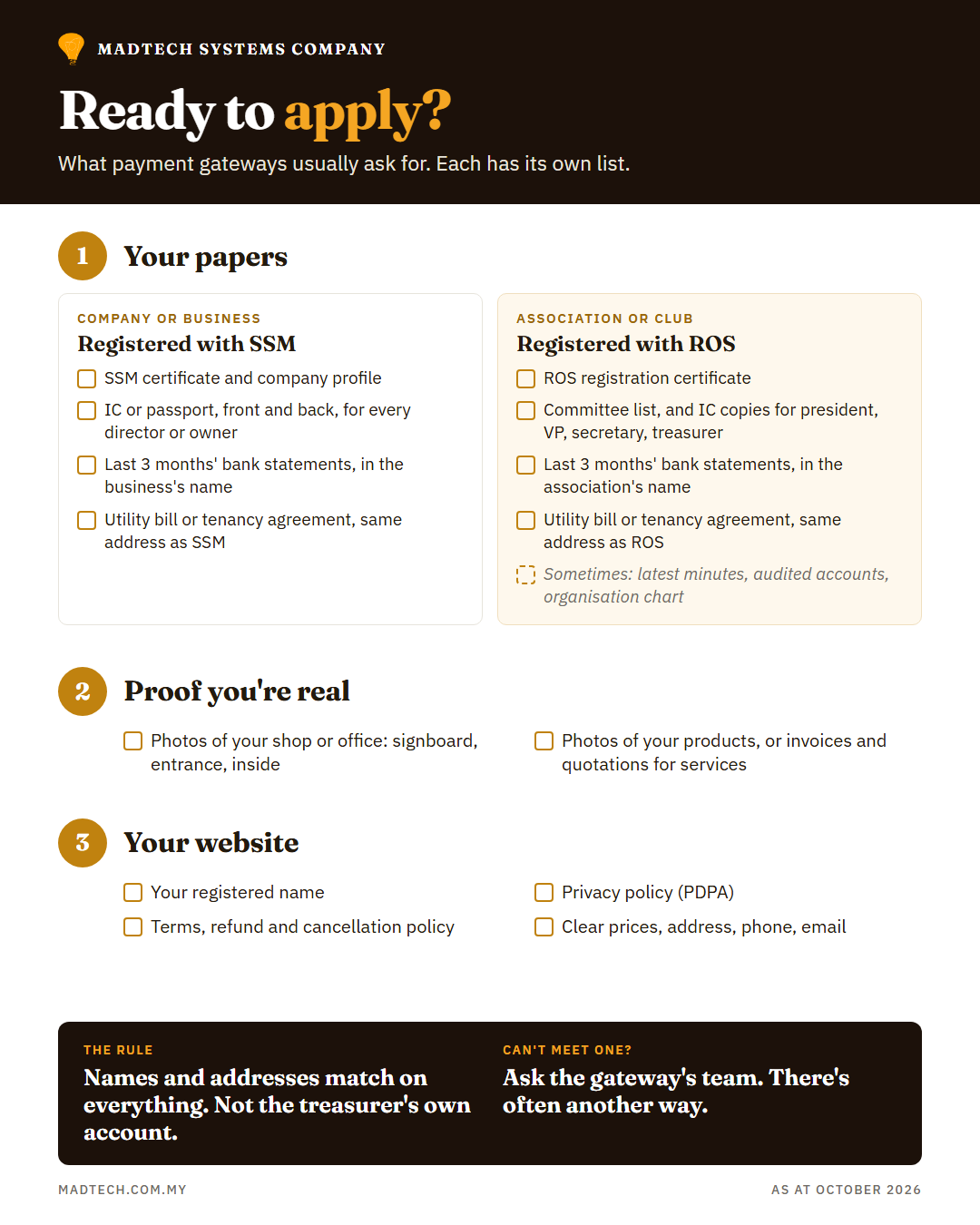
Gateways check who you are, and your website, before they approve you. Each gateway has its own list, but expect to be asked for most of the following.
If you’re a company or business (registered with SSM):
- Your SSM registration: the certificate and company profile, or the business registration for a sole proprietor or partnership.
- IC or passport copies, front and back, for every director or owner.
- Bank statements for the last three months, from an account in the business’s name.
- A utility bill or tenancy agreement showing the same name and address as your SSM record.
If you’re an association or club (registered with the Registrar of Societies, ROS):
- Your ROS registration certificate.
- A list of your committee members, and IC copies, front and back, for the office bearers: president, vice-president, secretary and treasurer.
- Bank statements for the last three months, from an account in the association’s name.
- A utility bill or tenancy agreement showing the same name and address as your ROS registration.
- Some gateways also want your latest meeting minutes, your latest audited accounts and an organisation chart.
The names and addresses have to match across all of these. A bank account in the treasurer’s own name won’t pass.
Many gateways also want proof that you exist and sell what you say you sell: photos of your shop or office (the signboard, the entrance and the inside) and photos of your products. If you sell services, recent invoices or quotations may do instead.
If you can’t meet a requirement as written (an association with no premises of its own, say), talk to the gateway’s team. They can often suggest another way to meet it.
And not every gateway accepts societies, so if you’re an association, ask before you apply.
On your website:
- Your organisation’s name, as registered.
- A privacy policy that explains what personal data you collect, why, and who sees it, in line with the Personal Data Protection Act 2010.
- Terms and conditions, and a refund and cancellation policy: when people can cancel, whether they get their money back, and how.
- Clear prices, and contact details: address, phone and email.
Approval takes time, and a missing document sends you back to the queue. Start weeks before your event, not the week of it.
6. Check the features you need
Two features catch people out.
Recurring payments. If you want monthly donations or memberships, the gateway has to support them, usually by securely saving the donor’s card. Not all do. (More on what donation systems need in What a donation platform actually needs.)
Refunds. Some gateways let you refund from the dashboard, or from your own system. Others only refund cards, or make you handle refunds by hand.
7. Gateways change. Someone has to keep watching
Gateways get bought, move platforms and update their systems. When that happens, features can disappear.
One of our clients took monthly donations through their gateway for years. Then the gateway’s new owner moved accounts to its own platform, and monthly subscriptions weren’t available there yet. Their monthly donations went down, and nothing on their website had changed.
A gateway is not "set up once and forget". Someone needs to watch for notices from the gateway, test payments after changes, and check that the money in the bank matches the payments on the website.
In short
- Open the account in the receiver’s name.
- Choose by who’s paying: local, international, or both.
- Work out the fees on your own numbers: how many payments, how big, and whether a setup or yearly fee pays for itself at your volume.
- Gather your registration papers, IC copies, three months of bank statements and photos of your premises, all in the same name, and put your privacy, refund and cancellation policies on the website, before you apply. If you can’t meet a requirement, ask the gateway how else to meet it.
- Check for recurring payments and refunds if you need them.
- Make sure someone is watching after it goes live.
Madtech sets up payment gateways for associations, NGOs and small businesses, and looks after them afterwards. If you’re not sure which one fits, talk to us.